The Importance of Updating Your Iqama Photo
Changing your iqama photo is a crucial requirement for expatriates living in the Kingdom. Whether your appearance has changed significantly or you have recently renewed your passport, knowing how to change iqama picture online in Saudi Arabia is essential to avoid any legal or identification issues at airports or government offices.
Thanks to the Saudi Vision 2030 digital transformation, you no longer need to visit Jawazat offices repeatedly. You can now initiate the iqama picture change process directly through the Absher portal. This Saudi iqama picture update guide 2026 will walk you through the entire process, from requirements to the final approval via the Tawasul service.
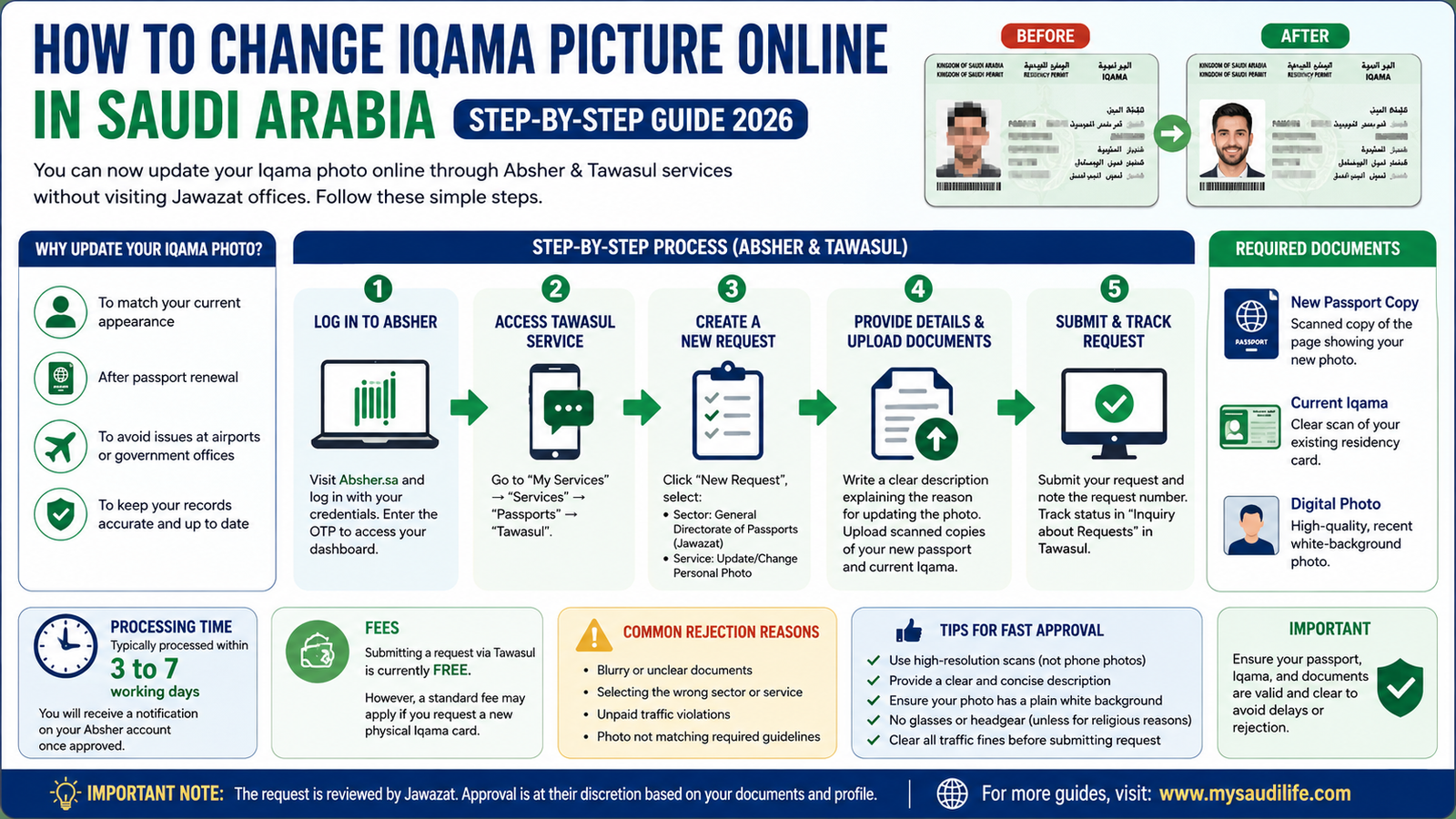
Table of Contents
- Requirements & Documents for Iqama Photo Update
- Step-by-Step Guide to Update Iqama Photo via Absher & Tawasul
- Processing Time & Fees
- Reasons for Rejection & Tips for Approval
- Frequently Asked Questions (FAQs)
Requirements & Documents for Iqama Photo Update
Before you start the iqama photo update online process, it is vital to understand the iqama photo change requirements Saudi Arabia. Jawazat (General Directorate of Passports) has strict criteria to ensure the security and accuracy of your digital identity. Many residents often ask about the specific steps to change iqama picture online in Saudi Arabia to ensure their digital records are current.
Key Requirements:
- Valid Passport: Your passport must be valid for at least 6 months.
- No Unpaid Violations: Ensure all traffic fines are cleared before submitting the request.
- Iqama Validity: Your current residency permit must be active.
- Appearance Change: A request is usually accepted if there is a significant change in appearance or an iqama photo not matching passport situation.
Documents Needed for Iqama Photo Update:
To ensure a smooth iqama picture change process, keep the following digital copies (PDF or JPEG) ready:
| Document Type | Requirement Details |
|---|---|
| New Passport Copy | Scanned copy of the page showing your new photo. |
| Current Iqama | A clear scan of your existing residency card. |
| Digital Photo | A high-quality, recent white-background photo. |
Having these documents needed for iqama photo update ready will prevent your request from being rejected by the Tawasul system.
Step-by-Step Guide to Update Iqama Photo via Absher & Tawasul
Follow this iqama picture update step by step guide to submit your request correctly through the update personal photo in Absher service.
Step 1: Log in to Absher Portal
Visit the official Absher website and log in with your credentials. Enter the OTP received on your registered mobile number to access your dashboard.
Step 2: Navigate to Tawasul Service
Go to “My Services” → “Services” → “Passports” and select “Tawasul”. This is the official channel to submit iqama photo request in Absher.
Step 3: Create a New Request
Click on “New Request” and select the following options:
- Sector: General Directorate of Passports (Jawazat).
- Service: Update/Change Personal Photo.
Step 4: Provide Description and Upload Files
In the description box, clearly state that you want to update iqama photo through Absher to match your new passport. Attach the scanned documents (Passport and Iqama) and click submit. You will receive a request number for tracking.
Processing Time & Fees
One of the most common questions is, “How long does iqama photo update take?” and “Is there any fee for iqama photo change?”. Here are the latest details for 2026:
- Processing Time: Typically, the Jawazat tawasul photo update request is processed within 3 to 7 working days. You will receive a notification on your Absher account once it is approved.
- Fees: Currently, there is no official fee to submit a photo update request through the Tawasul service. However, if you need a physical print of your new Iqama card, a standard replacement fee might apply.
Reasons for Rejection & Tips for Approval
Sometimes, a Jawazat photo update request rejected status can appear. Understanding the common reasons can help you get approval on the first try.
Common Reasons for Rejection:
- Blurry Documents: If the scanned copy of your passport or Iqama is not clear.
- Incorrect Category: Choosing the wrong sector or service in the Tawasul menu.
- Unpaid Fines: Having outstanding traffic violations.
Tips for Fast Approval:
- High-Resolution Scans: Use a scanner instead of a phone camera for documents.
- Clear Description: Write a concise note in Arabic or English explaining the reason for the update.
- Follow Photo Guidelines: Ensure your digital photo has a plain white background and no glasses or headgear (unless for religious reasons).
Frequently Asked Questions (FAQs)
1. Can I change my Iqama photo without a new passport?
Usually, Jawazat requires a valid reason such as a significant change in appearance or a new passport. It is highly recommended to have your new passport photo updated first.
2. Is it mandatory to visit Jawazat for a photo update?
No, with the Tawasul service in Absher, you can submit the request online. You only need to visit if specifically requested by the department or to collect a printed card.
3. What should I do if my Tawasul request is rejected?
Check the rejection reason provided in Absher. Most rejections are due to unclear document scans. Re-scan your documents in high resolution and submit a new request.
Conclusion
Updating your iqama photo online has become a seamless process thanks to the Absher and Tawasul services. By following this Saudi iqama picture update guide 2026, you can ensure your residency permit remains accurate and up-to-date without the hassle of manual visits. Following these steps is the most reliable way to change iqama picture online in Saudi Arabia and stay compliant with local regulations.


Leave a Reply